

Strategy Holds 717,131 BTC as Saylor Hints at 100th Acquisition
Strategy is closing in on its 100th Bitcoin purchase after chairman Michael Saylor posted a familiar hint that traders often treat as a preview of the company’s next move.
Key Takeaways
- Strategy now holds 717,131 BTC across 99 purchases, putting its next buy on track to be a symbolic 100th acquisition.
- Saylor’s post, “The Orange Century,” reignited speculation just as Bitcoin traded below Strategy’s average cost.
- The firm has bought Bitcoin for 12 straight weeks, leaning on debt and equity financing to keep accumulating.
- Strategy’s Bitcoin position is currently underwater, with reported paper losses and investor focus locked on what comes next.
What Happened?
Michael Saylor posted “The Orange Century” alongside a screenshot of a purchase tracker that lists Strategy’s Bitcoin buys since 2020. Traders have seen this pattern before, and many took it as a signal that Strategy may soon announce another Bitcoin purchase, which would be the company’s 100th.
At the same time, Strategy’s stock moved higher as investors watched for confirmation, while Bitcoin remained well below its recent peak.
Saylor’s Hint Puts the Spotlight Back on a Familiar Playbook
Saylor’s weekend post was short, but it landed loudly. He shared a chart from StrategyTracker, a move he has repeatedly made ahead of past purchase announcements, and captioned it “The Orange Century.” Markets have come to associate these posts with incoming updates on Strategy’s next Bitcoin buy.
If an announcement follows, it would mark Strategy’s 100th purchase since it began accumulating Bitcoin in August 2020. That milestone matters not because it changes the math, but because it reinforces the company’s identity. Strategy is not treating Bitcoin as a side bet. It has built its corporate story around holding Bitcoin as a treasury reserve asset.
Strategy’s Latest Purchases Show How Aggressive the Accumulation Has Been
Strategy disclosed on February 17 that it bought 2,486 BTC for about $168.4 million, paying an average of $67,710 per coin in that transaction. The purchase pushed total holdings up to 717,131 BTC.
Earlier, between January 20 and January 25, the company bought another 2,932 BTC for about $264.1 million, at an average price of $90,061 per coin including fees and expenses. The gap between January’s higher entry price and February’s lower one highlights how fast Bitcoin’s price can swing, and how Strategy keeps buying through it.
Overall, Strategy’s average cost is widely reported at $76,027 per BTC across its 99 purchases. Some disclosures also put total spending around $54.52 billion for the position.
Paper Losses Grow as Bitcoin Trades Below Strategy’s Average Cost
Bitcoin has been under pressure, sitting near $66,324 in the latest pricing referenced in the reports. It is also described as nearly 48% below a peak of $126,080.
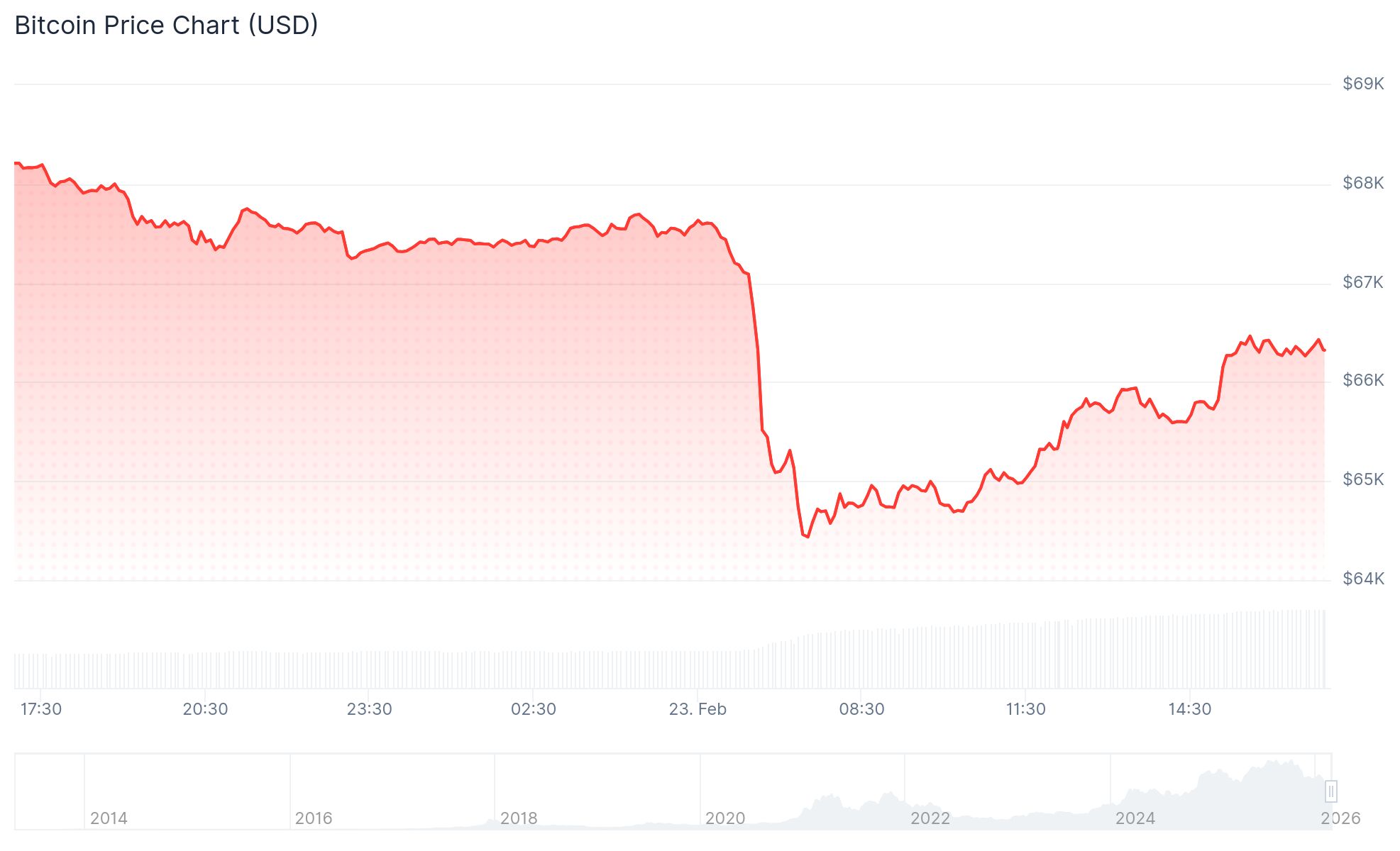 Image Credit – CoinGecko.com
With Bitcoin below Strategy’s average cost, the firm is now in an unrealized loss position. One set of figures puts the unrealized loss around $6.7 billion, while another estimate frames the paper loss at about 13.62%, with the Bitcoin holdings valued at over $47 billion based on current prices. The exact number moves with the market, but the direction is clear: Strategy is feeling the drawdown.
MSTR Stock Moves With Bitcoin, and With Expectations
Strategy’s stock closed at $131.05 on February 20 after trading between $130.68 and $133.83. The same coverage tied the move to fresh speculation about the next purchase.
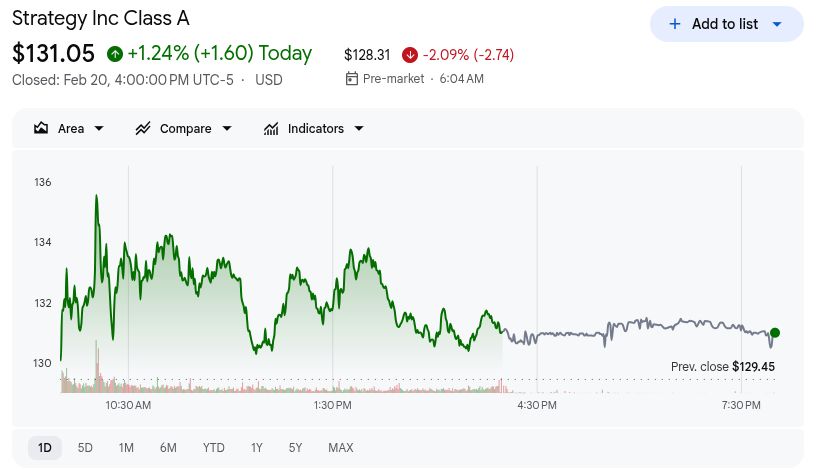 Image Credit – Google Finance
But investor conviction has been tested. Shares are described as down over 61% over the last six months, even as longer term performance remains dramatic, up about 950% since the company’s first Bitcoin buy in 2020, rising from roughly $12.44 to around $131.05.
Funding Questions and Saylor’s Confidence Test
Strategy’s buying streak is not small. The firm has purchased Bitcoin for 12 consecutive weeks, funded through tools like convertible debt and equity offerings. That approach has raised concerns about refinancing pressure if Bitcoin weakness persists.
Saylor has pushed back on those worries. He has said Strategy could withstand a drawdown to $8,000 per Bitcoin without threatening the company’s balance sheet, arguing that leverage is manageable relative to the size of its holdings.
CoinLaw’s Takeaway
I see this as Strategy doubling down on what it already is: a Bitcoin proxy with a corporate wrapper. In my experience, the market does not just price the Bitcoin holdings, it prices the narrative and the next purchase. That is why a simple post like “The Orange Century” can move attention so quickly. The risk is obvious: when Bitcoin drops, the pain shows up fast in paper losses and sentiment. But if Strategy confirms a 100th purchase, it will send the message that the company is still playing the same game, even when the price action looks ugly.
The post Strategy Holds 717,131 BTC as Saylor Hints at 100th Acquisition appeared first on CoinLaw.
You May Also Like

The Stunning ASEAN Winner Emerges As Manufacturing Shifts Accelerate

MySQL Single Leader Replication with Node.js and Docker
command: --server-id=1 --log-bin=ON The --server-id option gives each MySQL server in your replication setup its own name tag. Each one has to be unique and without it, replication won’t work at all. Another cool option not included here is binlog_format=ROW. This tells MySQL how to keep track of changes before passing them along to the replicas. By default, MySQL already uses row-based replication, but you can explicitly set it to ROW to be sure or switch it to STATEMENT if you’d rather log the actual SQL statements instead of row-by-row changes. \ Run our containers on docker Now, in the terminal, we can run the following command to spin up our database containers: docker-compose up -d \ Setting Up Our Master (Primary) Server To configure our master server, we would have to first access the running instance on docker using the following command docker exec -it mysql-master bash This command opens an interactive Bash shell inside the running Docker container named mysql-master, allowing us to run commands directly inside that container. \ Now that we’re inside the container, we can access the MySQL server and start running commands. type: mysql -uroot -p This will log you into MySQL as the root user. You’ll be prompted to enter the password you set in your docker-compose.yml file. \ Next, we need to create a special user that our replicas will use to connect to the master server and pull data. Inside the MySQL prompt, run the following commands: \ CREATE USER 'repl_user'@'%' IDENTIFIED BY 'replication_pass'; GRANT REPLICATION SLAVE ON . TO 'repl_user'@'%'; FLUSH PRIVILEGES; Here’s what’s happening: CREATE USER makes a new MySQL user called repl_user with the password replication_pass. GRANT REPLICATION SLAVE gives this user permission to act as a replication client. FLUSH PRIVILEGES tells MySQL to reload the user permissions so they take effect immediately. \ Time to Configure the Replica (Secondary) Servers a. First, let’s access the replica containers the same way we did with the master. Run this command in your terminal for each of the replica containers: \ docker exec -it <replica_container_name> bash mysql -uroot -p <replica_container_name> should be replace with the name of the replica container you are trying to setup b. Now it’s time to tell our replica where to get its data from. While inside the replica’s MySQL shell, run the following command to configure replication using the master’s details: CHANGE REPLICATION SOURCE TO SOURCE_HOST='mysql-master', SOURCE_USER='repl_user', SOURCE_PASSWORD='replication_pass', GET_SOURCE_PUBLIC_KEY=1; With the replication settings in place, let’s fire up the replica and get it syncing with the master. Still inside the MySQL shell on the replica, run: START REPLICA; This starts the replication process. To make sure everything is working, check the replica’s status with:
SHOW REPLICA STATUS\G; Look for Replica_IO_Running and Replica_SQL_Running — if both say Yes, congratulations! 🎉 Your replica is now successfully connected to the master and replicating data in real time.
Testing Our Replication Setup from the Node.js App Now that our replication is successfully set up, we can configure our Node.js server to observe the real-time effect of data being replicated from the master server to the replica server whenever we write to it. We start by installing the following dependencies:
npm i express mysql2 sequelize \ Now create a folder called src in the root directory and add the following files inside that folder connection.js, index.js and model.js. Our current directory should look like this We can now set up our connections to our master and replica server in the connection.js file as shown below
const Sequelize = require("sequelize"); const sequelize = new Sequelize({ dialect: "mysql", replication: { write: { host: "127.0.0.1", username: "root", password: "master", database: "replicaDb", }, read: [ { host: "127.0.0.1", username: "root", password: "slave", database: "replicaDb", port: 3307 }, { host: "127.0.0.1", username: "root", password: "slave", database: "replicaDb", port: 3308 }, { host: "127.0.0.1", username: "root", password: "slave", database: "replicaDb", port: 3309 }, ], }, }); async function connectdb() { try { await sequelize.authenticate(); } catch (error) { console.error("❌ unable to connect to the follower database", error); } } connectdb(); module.exports = { sequelize, }; \ We can now create a User table in the model.js file
const {DataTypes} = require("sequelize"); const { sequelize } = require("./connection"); const User = sequelize.define("User", { name: { type: DataTypes.STRING, allowNull: false, }, email: { type: DataTypes.STRING, unique: true, allowNull: false, }, }); module.exports = User \ and finally in our index.js file we can start our server and listen for connections on port 3000. from the code sample below, all inserts or updates will be routed by sequelize to the master server. while all read queries will be routed to the read replicas.
const express = require("express"); const { sequelize } = require("./connection"); const User = require("./model"); const app = express(); app.use(express.json()); async function main() { await sequelize.sync({ alter: true }); app.get("/", (req, res) => { res.status(200).json({ message: "first step to setting server up", }); }); app.post("/user", async (req, res) => { const { email, name } = req.body; let newUser = await User.build({ name, email, }); // This INSERT will go to the write (master) connection newUser = newUser.save({ returning: false }); res.status(201).json({ message: "User successfully created", }); }); app.get("/user", async (req, res) => { // This SELECT query will go to one of the read replicas const users = await User.findAll(); res.status(200).json(users); }); app.listen(3000, () => { console.log("server has connected"); }); } main(); When you make a POST request to the /users endpoint, take a moment to check both the master and replica servers to observe how data is replicated in real time. Right now, we are relying on Sequelize to automatically route requests, which works for development but isn’t robust enough for a production environment. In particular, if the master node goes down, Sequelize cannot automatically redirect requests to a newly elected leader. In the next part of this series, we’ll explore strategies to handle these challenges
