This evaluation examines Dockerized Android’s strengths and limits: emulators support automated ADB features (SMS injection, GPS emulation, container IPs) but miss hardware like Bluetooth, forcing real-device tests for vectors like BlueBorne. The paper reproduces attacks (CVE-2018-7661 PoC and BlueBorne kill-chains), highlights cross-platform compatibility issues (WSL nested virtualization, macOS USB sharing), and maps which platform requirements are fully/partially met.This evaluation examines Dockerized Android’s strengths and limits: emulators support automated ADB features (SMS injection, GPS emulation, container IPs) but miss hardware like Bluetooth, forcing real-device tests for vectors like BlueBorne. The paper reproduces attacks (CVE-2018-7661 PoC and BlueBorne kill-chains), highlights cross-platform compatibility issues (WSL nested virtualization, macOS USB sharing), and maps which platform requirements are fully/partially met.

How Dockerized Android Performs Across Different Operating Systems

:::info Authors:

(1) Daniele Capone, SecSI srl, Napoli, Italy (daniele.capone@secsi.io);

(2) Francesco Caturano, Dept. of Electrical Engineering and Information, Technology University of Napoli Federico II, Napoli, Italy (francesco.caturano@unina.i)

(3) Angelo Delicato, SecSI srl, Napoli, Italy (angelo.delicato@secsi.io);

(4) Gaetano Perrone, Dept. of Electrical Engineering and Information Technology, University of Napoli Federico II, Napoli, Italy (gaetano.perrone@unina.it)

(5) Simon Pietro Romano, Dept. of Electrical Engineering and Information Technology, University of Napoli Federico II, Napoli, Italy (spromano@unina.it).

:::

Abstract and I. Introduction

II. Related Work

III. Dockerized Android: Design

IV. Dockerized Android Architecture

V. Evaluation

VI. Conclusion and Future Developments, and References

V. EVALUATION

This section assesses the Dockerized Android platform by examining several aspects. Firstly, we emphasize the differences between the Core for Emulator and Core for Real Device components in terms of features and highlight compatibility with the three most used Operating Systems. Then, we provide practical usage examples of Dockerized Android and discuss coverage of the requirements defined in Section III.

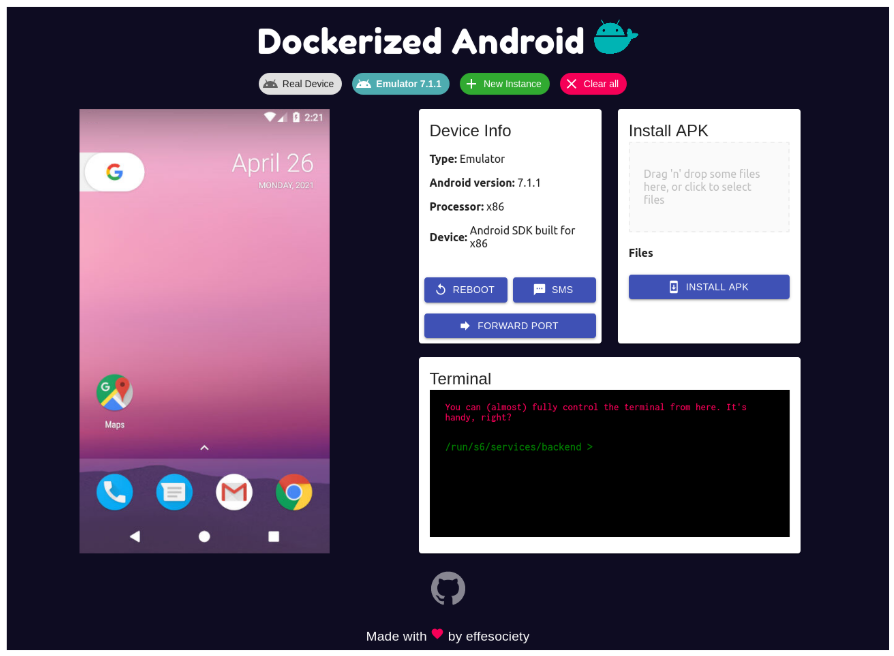
\ Fig. 3. UI Dockerized Android
\ A. Differences between Core for Emulator and Core for Real Device

\ Even if a significant effort has been put into creating a system that has the same features for both kinds of devices, there are limitations when emulation is used:

\ • SMS ADB send/reception feature: in emulated devices, it is possible to automate the send and reception of SMS messages through the ADB software. Obviously, this is not natively possible for real devices. Therefore, the user must manually send and receive SMS messages to implement SMS attack scenarios. A solution to address this problem could be the realization of a custom Android application that could be installed on a real device and could be instrumented to send and receive messages automatically.

\ • Networking: networking is quite different between the Emulator and the Real device flavors. In the emulator version, the AVD is created inside the Docker container, and therefore it shares the container’s IP address. Instead, the real device is physically connected to the machine that runs the container and keeps its own IP address.

\ • Hardware virtualization: for the hardware components, the situation is quite different, too: some hardware devices like the GPS and the microphone can be emulated. In particular, the GPS location of the device can be set through ADB, and the microphone of the host machine can be shared with the emulator. There are other hardware components that currently cannot be emulated, like, e.g. Bluetooth.

\ B. Host evaluation for cross-platform compatibility

\ The non-functional requirement NF04 (Cross-platform compatibility) states that the resulting system should be usable from within any host OS. This refers to the OS of the machine that runs the Docker containers. Table III provides a summary of the compatibility with Linux, Windows, and OS X.

\ TABLE IIIHOST OS COMPATIBILITY COMPARISON

\ The problem with Windows is that currently, the best way to use Docker is through the Windows Subsystem for Linux (WSL) framework. Unfortunately, WSL does not support nested virtualization yet, and this feature is required to run the Android emulator inside a Docker container. However, the feature will be available in upcoming WSL releases. It might be possible to run the Core for Emulator flavor on Windows by using a virtual machine, though losing all of the performance benefits associated with containerization. A similar issue does exist with OS X, with which there is currently no way to run the Core for Emulator. Besides, OS X does not allow sharing the USB device with a Docker container. For this reason, the only ways to use the Core for Real Device flavor are to either run ADB over Wi-Fi or connect to the host ADB from within the Docker container.

\ In the remainder of this section, we show the effectiveness of Dockerized Android in reproducing security kill chains by using both the Core for Emulator and Core for Real Device.

\ C. Security attack reproduction on the emulator

\ We herein focus on a sample vulnerability scenario associated with CVE-2018-7661[1]. This CVE is related to the free version of the application “Wi-Fi Baby Monitor”. This application has to be installed on two devices in order to act as a so-called baby monitor (a radio system used to remotely listen to sounds emitted by an infant). As reported in the National Vulnerability Database, “Wi-Fi Baby Monitor Free & Lite” before version 2.02.2 allows remote attackers to obtain audio data via certain specific requests to TCP port numbers 8258 and 8257”.

\ TABLE IVREQUIREMENTS FOR WI-FI BABY MONITOR

\ The premium version of this application offers users the ability to specify a password to use in the pairing process. By monitoring the network traffic, it is possible to observe that:

\ • the initial connection takes place on port 8257;

\ • the same sequence is always sent to start the pairing process;

\ • at the end of the pairing process, a new connection is started on port 8258. This port is used to transmit the audio data;

\ • after connecting to the port 8258, the other connection on the port 8257 is kept open and used as a heartbeat for the session;

\ • on the heartbeat connection, the client periodically sends the hexadecimal byte 0x01 (about once per second);

\ The proof of concept that allows the attacker to obtain audio data is given in [21]. This Proof of Concept (PoC) is easily reproducible on Dockerized Android through the realization of an infrastructure composed of three services:

\ • core-emulator: an instance of the Core component with a pre-installed Baby Monitor app acting as the sender;

\ • ui: the UI component to control what is going on;

\ • attacker: a customized version of Kali Linux that automatically installs all the dependencies needed for the execution of the PoC.

\ This is also a perfect example to show the Port Forwarding feature used to enable the communications.

\ D. Security attack reproduction on the real device

\ With the real device, we examine a further vulnerability, known as BlueBorne. The term “BlueBorne” refers to multiple security vulnerabilities related to the implementation of Bluetooth. These vulnerabilities were discovered by a group of researchers from Armis Security, an IoT security company, in September 2017. According to Armis, at the time of discovery, around 8.2 billion devices were potentially affected by the BlueBorne attack vector, which affects the Bluetooth implementations in Android, iOS, Microsoft, and Linux, hence impacting almost all Bluetooth device types such as smartphones, laptops, and smartwatches. BlueBorne was analyzed in detail in a paper published on the 12th of September 2017 by Ben Seri and Gregor Vishnepolsk [22]. Eight different vulnerabilities can be used as part of the attack vector.

\ Regarding Android, all devices and versions (therefore versions older than Android Oreo, which was released in December 2017) are affected by the above-mentioned vulnerabilities, except for devices that support BLE (Bluetooth Low Energy). In general, two requirements should be satisfied to exploit the vulnerability: (i) the target device must have Bluetooth enabled; (ii) the attacker must be close enough to the target device. As the Bluetooth feature is not available in the Core Emulator, the kill-chain in question can only be reproduced on real devices.

\ 1) BlueBorne full reproduction on Dockerized Android: In order to show the effectiveness of Dockerized Android, we developed a kill chain that exploits two Remote Code Execution (RCE) vulnerabilities that affect Android, i.e., CVE-2017- 0781 and CVE-2017-0782. These vulnerabilities fall within the Bluetooth set vulnerability’s set defined “BlueBorne” and discovered by a group of security researchers from Armis Security [23].

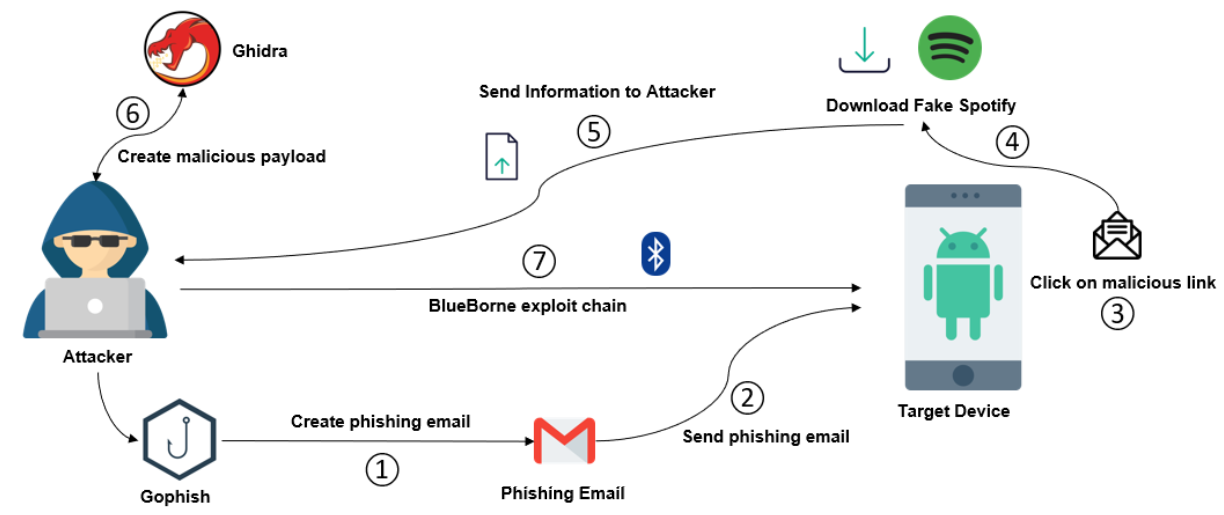
\ The diagram in Fig. 4 gives an overview of the developed kill chain:

\

  1. The attacker creates a phishing email through Gophish, a phishing generator software.

\ 2) The phishing email is sent to a victim’s mailbox.

\ 3) The victim reads the phishing email and erroneously clicks a malicious link contained in the email’s body.

\ 4) The malicious link allows the attacker to trigger an attack that downloads and installs a fake application on the victim’s mobile device.

\ 5) The malicious information sends relevant mobile information to the attacker. This information is required for the exploitation of the two vulnerabilities.

\ 6) The attacker crafts a malicious payload to exploit the vulnerabilities.

\ 7) The attacker sends the attack by exploiting the Bluetooth component’s vulnerabilities and has remote access to the victim’s device.

\ Fig. 4. Exploit Chain Overview
\ The complex scenario covers several threats defined in Table I. Table V shows such threats and both the platform functionalities and components that allow the scenario reproduction. The

\ TABLE VTHREATS, SCENARIO’S STEPS, FEATURES AND COMPONENTS
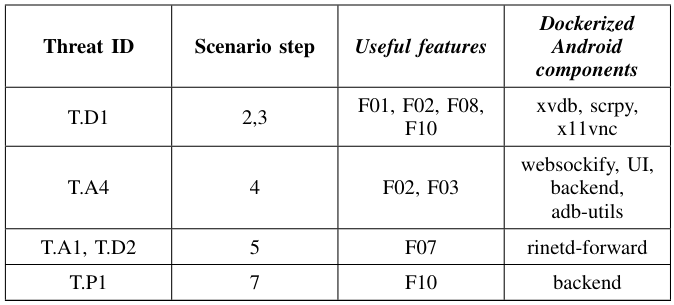
\ scenario requires complex network communications (F07) and involves the utilization of Bluetooth. For this reason, we have to use a physical device (F10). In the proposed scenario, we have to simulate the installation of the malicious application when the user receives the email. This can be done either manually (F02) or by implementing utility ADB scripts (F03). In order to reproduce the scenario, additional elements are needed:

\ • Gophish: a webapp that allows to craft and send phishing emails, for which a Docker version already exists.

\ • Ghidra: an application created by the National Security Agency (NSA) for reverse engineering purposes. In this context, it is used to get some useful information about the target device. This application is used on the host machine without Docker.

\ • Fake Spotify: a seemingly benign application that pretends to provide the user with a free version of the well-known Spotify Premium app, but rather sends to the attacker’s server exfiltrated files that are reverse-engineered on Ghidra. Also, this app was created without the usage of Docker.

\ Listing 1. docker-compose.yaml for the BlueBorne kill chain
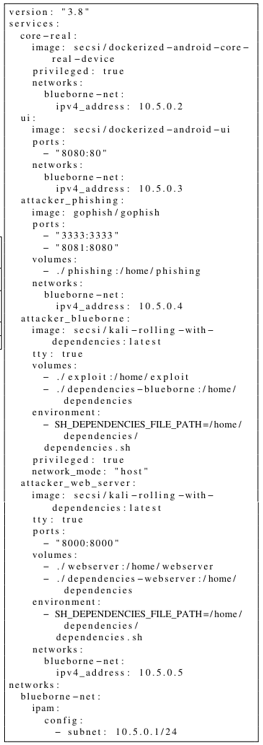
\ It is composed of five services, two of which are the subcomponents of Dockerized Android. The remaining three are briefly described in the following:

\ • attacker_phishing: contains the Gophish component used to craft and send the phishing email that tricks the user into downloading the malicious Fake Spotify app;

\ • attackerwebserver: contains the webserver used to receive the files sent by the malicious app, which are reverse engineered in order to find information allowing the attacker to exploit the vulnerability on the target device;

\ • attacker_blueborne: the service used by the attacker to execute the attack on the target device and obtain a reverse shell on it.

\ E. Requirements coverage

\ In Table II we have illustrated the defined requirements for the realization of our platform. The following table contains all the requirements and their corresponding status:

\ TABLE VIREQUIREMENTS EVALUATION
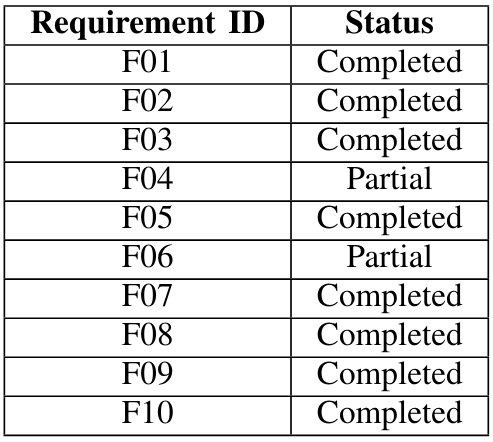
\ Requirement F04, as detailed before, is set to Partial because of the inability to correctly configure all the hardware components (for example the Bluetooth device). Requirement F06 is set to partial because ADB gives the ability to record the screen out-of-the-box, but this feature was not exposed or made easier to use through the UI. Finally, requirements F07 (Network Configuration) and F09 (Third-Party Tools integration) are granted by default because of the usage of Docker. The network can be defined in any possible way through the docker-compose file, and third-party tools can be easily used together with this system.

\

:::info This paper is available on arxiv under CC by-SA 4.0 Deed (Attribution-Sahrealike 4.0 International license.

:::


[1] https://cve.mitre.org/cgi-bin/cvename.cgi?name=CVE-2018-7661

Piyasa Fırsatı
GoPlus Security Logosu
GoPlus Security Fiyatı(GPS)
$0.005124
$0.005124$0.005124
-0.42%
USD
GoPlus Security (GPS) Canlı Fiyat Grafiği
Sorumluluk Reddi: Bu sitede yeniden yayınlanan makaleler, halka açık platformlardan alınmıştır ve yalnızca bilgilendirme amaçlıdır. MEXC'nin görüşlerini yansıtmayabilir. Tüm hakları telif sahiplerine aittir. Herhangi bir içeriğin üçüncü taraf haklarını ihlal ettiğini düşünüyorsanız, kaldırılması için lütfen service@support.mexc.com ile iletişime geçin. MEXC, içeriğin doğruluğu, eksiksizliği veya güncelliği konusunda hiçbir garanti vermez ve sağlanan bilgilere dayalı olarak alınan herhangi bir eylemden sorumlu değildir. İçerik, finansal, yasal veya diğer profesyonel tavsiye niteliğinde değildir ve MEXC tarafından bir tavsiye veya onay olarak değerlendirilmemelidir.

Ayrıca Şunları da Beğenebilirsiniz

South Korea Launches Innovative Stablecoin Initiative

South Korea Launches Innovative Stablecoin Initiative

The post South Korea Launches Innovative Stablecoin Initiative appeared on BitcoinEthereumNews.com. South Korea has witnessed a pivotal development in its cryptocurrency landscape with BDACS introducing the nation’s first won-backed stablecoin, KRW1, built on the Avalanche network. This stablecoin is anchored by won assets stored at Woori Bank in a 1:1 ratio, ensuring high security. Continue Reading:South Korea Launches Innovative Stablecoin Initiative Source: https://en.bitcoinhaber.net/south-korea-launches-innovative-stablecoin-initiative
Paylaş
BitcoinEthereumNews2025/09/18 17:54
Trump Cancels Tech, AI Trade Negotiations With The UK

Trump Cancels Tech, AI Trade Negotiations With The UK

The US pauses a $41B UK tech and AI deal as trade talks stall, with disputes over food standards, market access, and rules abroad.   The US has frozen a major tech
Paylaş
LiveBitcoinNews2025/12/17 01:00
Summarize Any Stock’s Earnings Call in Seconds Using FMP API

Summarize Any Stock’s Earnings Call in Seconds Using FMP API

Turn lengthy earnings call transcripts into one-page insights using the Financial Modeling Prep APIPhoto by Bich Tran Earnings calls are packed with insights. They tell you how a company performed, what management expects in the future, and what analysts are worried about. The challenge is that these transcripts often stretch across dozens of pages, making it tough to separate the key takeaways from the noise. With the right tools, you don’t need to spend hours reading every line. By combining the Financial Modeling Prep (FMP) API with Groq’s lightning-fast LLMs, you can transform any earnings call into a concise summary in seconds. The FMP API provides reliable access to complete transcripts, while Groq handles the heavy lifting of distilling them into clear, actionable highlights. In this article, we’ll build a Python workflow that brings these two together. You’ll see how to fetch transcripts for any stock, prepare the text, and instantly generate a one-page summary. Whether you’re tracking Apple, NVIDIA, or your favorite growth stock, the process works the same — fast, accurate, and ready whenever you are. Fetching Earnings Transcripts with FMP API The first step is to pull the raw transcript data. FMP makes this simple with dedicated endpoints for earnings calls. If you want the latest transcripts across the market, you can use the stable endpoint /stable/earning-call-transcript-latest. For a specific stock, the v3 endpoint lets you request transcripts by symbol, quarter, and year using the pattern: https://financialmodelingprep.com/api/v3/earning_call_transcript/{symbol}?quarter={q}&year={y}&apikey=YOUR_API_KEY here’s how you can fetch NVIDIA’s transcript for a given quarter: import requestsAPI_KEY = "your_api_key"symbol = "NVDA"quarter = 2year = 2024url = f"https://financialmodelingprep.com/api/v3/earning_call_transcript/{symbol}?quarter={quarter}&year={year}&apikey={API_KEY}"response = requests.get(url)data = response.json()# Inspect the keysprint(data.keys())# Access transcript contentif "content" in data[0]: transcript_text = data[0]["content"] print(transcript_text[:500]) # preview first 500 characters The response typically includes details like the company symbol, quarter, year, and the full transcript text. If you aren’t sure which quarter to query, the “latest transcripts” endpoint is the quickest way to always stay up to date. Cleaning and Preparing Transcript Data Raw transcripts from the API often include long paragraphs, speaker tags, and formatting artifacts. Before sending them to an LLM, it helps to organize the text into a cleaner structure. Most transcripts follow a pattern: prepared remarks from executives first, followed by a Q&A session with analysts. Separating these sections gives better control when prompting the model. In Python, you can parse the transcript and strip out unnecessary characters. A simple way is to split by markers such as “Operator” or “Question-and-Answer.” Once separated, you can create two blocks — Prepared Remarks and Q&A — that will later be summarized independently. This ensures the model handles each section within context and avoids missing important details. Here’s a small example of how you might start preparing the data: import re# Example: using the transcript_text we fetched earliertext = transcript_text# Remove extra spaces and line breaksclean_text = re.sub(r'\s+', ' ', text).strip()# Split sections (this is a heuristic; real-world transcripts vary slightly)if "Question-and-Answer" in clean_text: prepared, qna = clean_text.split("Question-and-Answer", 1)else: prepared, qna = clean_text, ""print("Prepared Remarks Preview:\n", prepared[:500])print("\nQ&A Preview:\n", qna[:500]) With the transcript cleaned and divided, you’re ready to feed it into Groq’s LLM. Chunking may be necessary if the text is very long. A good approach is to break it into segments of a few thousand tokens, summarize each part, and then merge the summaries in a final pass. Summarizing with Groq LLM Now that the transcript is clean and split into Prepared Remarks and Q&A, we’ll use Groq to generate a crisp one-pager. The idea is simple: summarize each section separately (for focus and accuracy), then synthesize a final brief. Prompt design (concise and factual) Use a short, repeatable template that pushes for neutral, investor-ready language: You are an equity research analyst. Summarize the following earnings call sectionfor {symbol} ({quarter} {year}). Be factual and concise.Return:1) TL;DR (3–5 bullets)2) Results vs. guidance (what improved/worsened)3) Forward outlook (specific statements)4) Risks / watch-outs5) Q&A takeaways (if present)Text:<<<{section_text}>>> Python: calling Groq and getting a clean summary Groq provides an OpenAI-compatible API. Set your GROQ_API_KEY and pick a fast, high-quality model (e.g., a Llama-3.1 70B variant). We’ll write a helper to summarize any text block, then run it for both sections and merge. import osimport textwrapimport requestsGROQ_API_KEY = os.environ.get("GROQ_API_KEY") or "your_groq_api_key"GROQ_BASE_URL = "https://api.groq.com/openai/v1" # OpenAI-compatibleMODEL = "llama-3.1-70b" # choose your preferred Groq modeldef call_groq(prompt, temperature=0.2, max_tokens=1200): url = f"{GROQ_BASE_URL}/chat/completions" headers = { "Authorization": f"Bearer {GROQ_API_KEY}", "Content-Type": "application/json", } payload = { "model": MODEL, "messages": [ {"role": "system", "content": "You are a precise, neutral equity research analyst."}, {"role": "user", "content": prompt}, ], "temperature": temperature, "max_tokens": max_tokens, } r = requests.post(url, headers=headers, json=payload, timeout=60) r.raise_for_status() return r.json()["choices"][0]["message"]["content"].strip()def build_prompt(section_text, symbol, quarter, year): template = """ You are an equity research analyst. Summarize the following earnings call section for {symbol} ({quarter} {year}). Be factual and concise. Return: 1) TL;DR (3–5 bullets) 2) Results vs. guidance (what improved/worsened) 3) Forward outlook (specific statements) 4) Risks / watch-outs 5) Q&A takeaways (if present) Text: <<< {section_text} >>> """ return textwrap.dedent(template).format( symbol=symbol, quarter=quarter, year=year, section_text=section_text )def summarize_section(section_text, symbol="NVDA", quarter="Q2", year="2024"): if not section_text or section_text.strip() == "": return "(No content found for this section.)" prompt = build_prompt(section_text, symbol, quarter, year) return call_groq(prompt)# Example usage with the cleaned splits from Section 3prepared_summary = summarize_section(prepared, symbol="NVDA", quarter="Q2", year="2024")qna_summary = summarize_section(qna, symbol="NVDA", quarter="Q2", year="2024")final_one_pager = f"""# {symbol} Earnings One-Pager — {quarter} {year}## Prepared Remarks — Key Points{prepared_summary}## Q&A Highlights{qna_summary}""".strip()print(final_one_pager[:1200]) # preview Tips that keep quality high: Keep temperature low (≈0.2) for factual tone. If a section is extremely long, chunk at ~5–8k tokens, summarize each chunk with the same prompt, then ask the model to merge chunk summaries into one section summary before producing the final one-pager. If you also fetched headline numbers (EPS/revenue, guidance) earlier, prepend them to the prompt as brief context to help the model anchor on the right outcomes. Building the End-to-End Pipeline At this point, we have all the building blocks: the FMP API to fetch transcripts, a cleaning step to structure the data, and Groq LLM to generate concise summaries. The final step is to connect everything into a single workflow that can take any ticker and return a one-page earnings call summary. The flow looks like this: Input a stock ticker (for example, NVDA). Use FMP to fetch the latest transcript. Clean and split the text into Prepared Remarks and Q&A. Send each section to Groq for summarization. Merge the outputs into a neatly formatted earnings one-pager. Here’s how it comes together in Python: def summarize_earnings_call(symbol, quarter, year, api_key, groq_key): # Step 1: Fetch transcript from FMP url = f"https://financialmodelingprep.com/api/v3/earning_call_transcript/{symbol}?quarter={quarter}&year={year}&apikey={api_key}" resp = requests.get(url) resp.raise_for_status() data = resp.json() if not data or "content" not in data[0]: return f"No transcript found for {symbol} {quarter} {year}" text = data[0]["content"] # Step 2: Clean and split clean_text = re.sub(r'\s+', ' ', text).strip() if "Question-and-Answer" in clean_text: prepared, qna = clean_text.split("Question-and-Answer", 1) else: prepared, qna = clean_text, "" # Step 3: Summarize with Groq prepared_summary = summarize_section(prepared, symbol, quarter, year) qna_summary = summarize_section(qna, symbol, quarter, year) # Step 4: Merge into final one-pager return f"""# {symbol} Earnings One-Pager — {quarter} {year}## Prepared Remarks{prepared_summary}## Q&A Highlights{qna_summary}""".strip()# Example runprint(summarize_earnings_call("NVDA", 2, 2024, API_KEY, GROQ_API_KEY)) With this setup, generating a summary becomes as simple as calling one function with a ticker and date. You can run it inside a notebook, integrate it into a research workflow, or even schedule it to trigger after each new earnings release. Free Stock Market API and Financial Statements API... Conclusion Earnings calls no longer need to feel overwhelming. With the Financial Modeling Prep API, you can instantly access any company’s transcript, and with Groq LLM, you can turn that raw text into a sharp, actionable summary in seconds. This pipeline saves hours of reading and ensures you never miss the key results, guidance, or risks hidden in lengthy remarks. Whether you track tech giants like NVIDIA or smaller growth stocks, the process is the same — fast, reliable, and powered by the flexibility of FMP’s data. Summarize Any Stock’s Earnings Call in Seconds Using FMP API was originally published in Coinmonks on Medium, where people are continuing the conversation by highlighting and responding to this story
Paylaş
Medium2025/09/18 14:40