Buy Crypto
Markets
Spot
FuturesBTC
Earn
Event Center
Rewards Hub
More
MEXC Affiliate Portal Event Calendar Upgrade: Get Promotional Links With Your Referral Code in One ClickMEXC Affiliate Portal Event Calendar Upgrade: Get Promotional Links With Your Referral Code in One Click
Category List
Cancel

MEXC Affiliate Portal Event Calendar Upgrade: Get Promotional Links With Your Referral Code in One Click

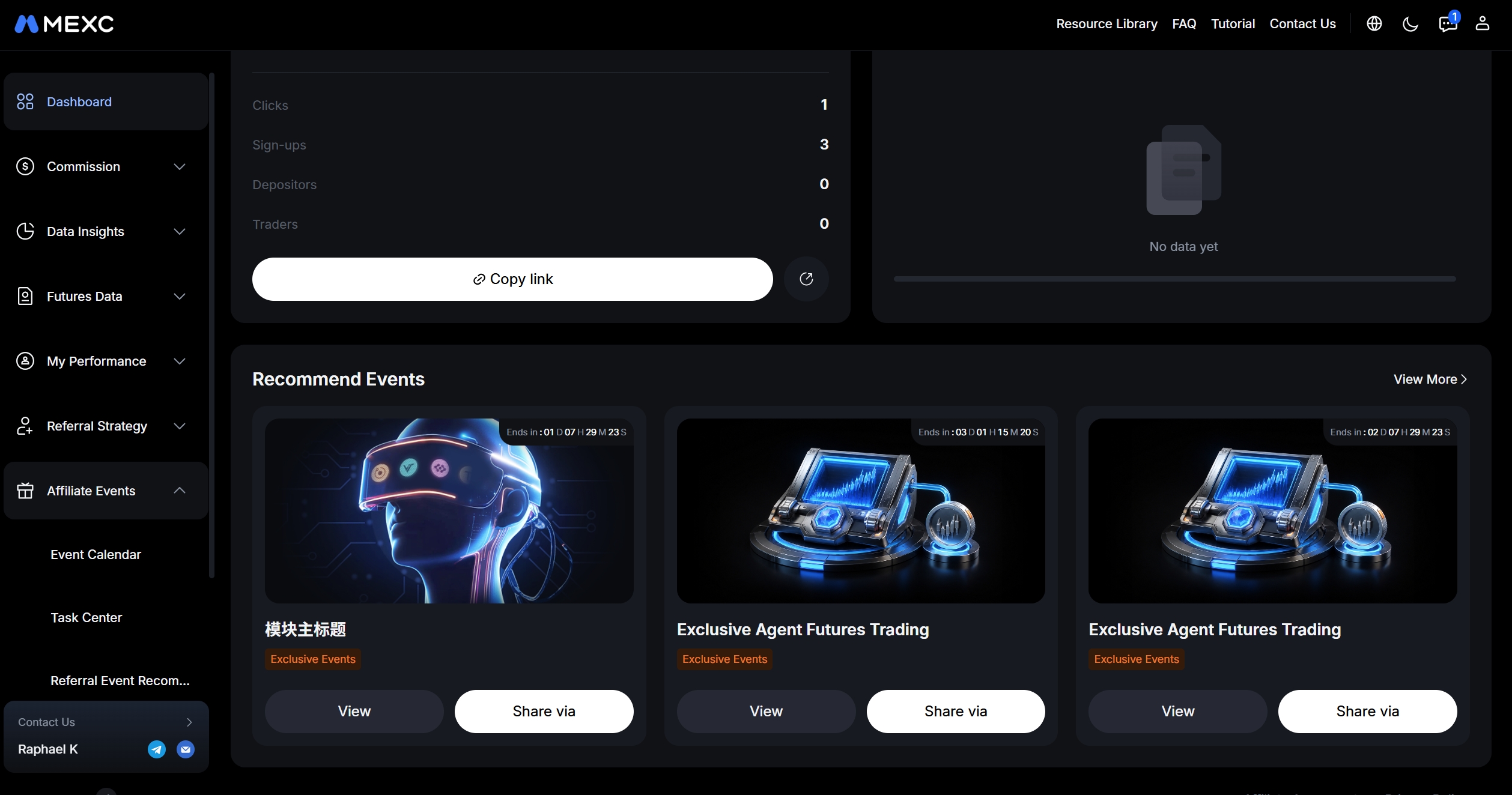
We have upgraded the events section of the MEXC Affiliate Portal to help you find relevant events to promote and quickly generate promotional links that include your referral code. This update introduces the Recommend Events section on the Dashboard and replaces the previous All Events page with Event Calendar. Events are now organized by source and purpose, helping you save time and find the right opportunities for your audience.

What's New in the MEXC Affiliate Portal


After logging in to the MEXC Affiliate Portal, you can browse events available to join or promote in the Recommend Events section on the Dashboard:

  • View event details: Click an event card to review its rules and details.
  • Share in one click: Click Share via to get an event link that automatically includes your unique referral code.
  • Browse all events: Click View More to open Event Calendar and browse all events available to you.
  • Track the countdown: Events with an end time display a countdown to help you plan your promotions.

Note: The Recommend Events section will not appear on the Dashboard when there are no events to display.

2. All Events Upgraded to Event Calendar


3. Share to Earn Joins Event Calendar as Promote & Earn


The updated Event Calendar organizes events into four categories to help you find what you need:

Event Category
What You'll Find
Exclusive Events
Exclusive events set up for you by your account manager, along with events suited to your promotional activities. If no exclusive events are available, the page will prompt you to contact your account manager to create one.
Promote & Earn
The existing promotion reward events, with no changes to the rules or participation process.
Regular Events
Ongoing and upcoming regular platform events that you can explore and promote.
Custom Events
Content previously available in the Template Center, helping you run promotions tailored to your needs.

4. How to Use Event Calendar on the MEXC Affiliate Portal


1) Log in to the MEXC Affiliate Portal and open the Dashboard.

2) Browse events in the Recommend Events section, or click View More.

3) In Event Calendar, browse the categories to find an event you want to join or promote.

4) Click View to review the event rules, or click Share via to get a personalized link containing your referral code. Share the link with relevant friends and communities to start promoting the event.

Important Notes:

  • Some events are subject to time limits, regional restrictions, eligibility requirements, or other event rules. Please refer to the event details page for the applicable conditions.
  • MEXC will continue to improve the selection of events displayed on the Affiliate Portal and the Event Calendar experience.
  • If no exclusive events are available on your page, contact your account manager to learn about other event opportunities.

MEXC Affiliate Portal Event Calendar Upgrade: Get Promotional Links With Your Referral Code in One Click

We have upgraded the events section of the MEXC Affiliate Portal to help you find relevant events to promote and quickly generate promotional links that include your referral code. This update introduces the Recommend Events section on the Dashboard and replaces the previous All Events page with Event Calendar. Events are now organized by source and purpose, helping you save time and find the right opportunities for your audience.

What's New in the MEXC Affiliate Portal


After logging in to the MEXC Affiliate Portal, you can browse events available to join or promote in the Recommend Events section on the Dashboard:

  • View event details: Click an event card to review its rules and details.
  • Share in one click: Click Share via to get an event link that automatically includes your unique referral code.
  • Browse all events: Click View More to open Event Calendar and browse all events available to you.
  • Track the countdown: Events with an end time display a countdown to help you plan your promotions.

Note: The Recommend Events section will not appear on the Dashboard when there are no events to display.

2. All Events Upgraded to Event Calendar


3. Share to Earn Joins Event Calendar as Promote & Earn


The updated Event Calendar organizes events into four categories to help you find what you need:

Event Category
What You'll Find
Exclusive Events
Exclusive events set up for you by your account manager, along with events suited to your promotional activities. If no exclusive events are available, the page will prompt you to contact your account manager to create one.
Promote & Earn
The existing promotion reward events, with no changes to the rules or participation process.
Regular Events
Ongoing and upcoming regular platform events that you can explore and promote.
Custom Events
Content previously available in the Template Center, helping you run promotions tailored to your needs.

4. How to Use Event Calendar on the MEXC Affiliate Portal


1) Log in to the MEXC Affiliate Portal and open the Dashboard.

2) Browse events in the Recommend Events section, or click View More.

3) In Event Calendar, browse the categories to find an event you want to join or promote.

4) Click View to review the event rules, or click Share via to get a personalized link containing your referral code. Share the link with relevant friends and communities to start promoting the event.

Important Notes:

  • Some events are subject to time limits, regional restrictions, eligibility requirements, or other event rules. Please refer to the event details page for the applicable conditions.
  • MEXC will continue to improve the selection of events displayed on the Affiliate Portal and the Event Calendar experience.
  • If no exclusive events are available on your page, contact your account manager to learn about other event opportunities.